





Price: ₹2,240 - ₹115.00
(as of Nov 22, 2025 14:36:29 UTC – Details)
Product Description


Jin Office Multifunctional Universal Thin CPU Mount | CPU Holder
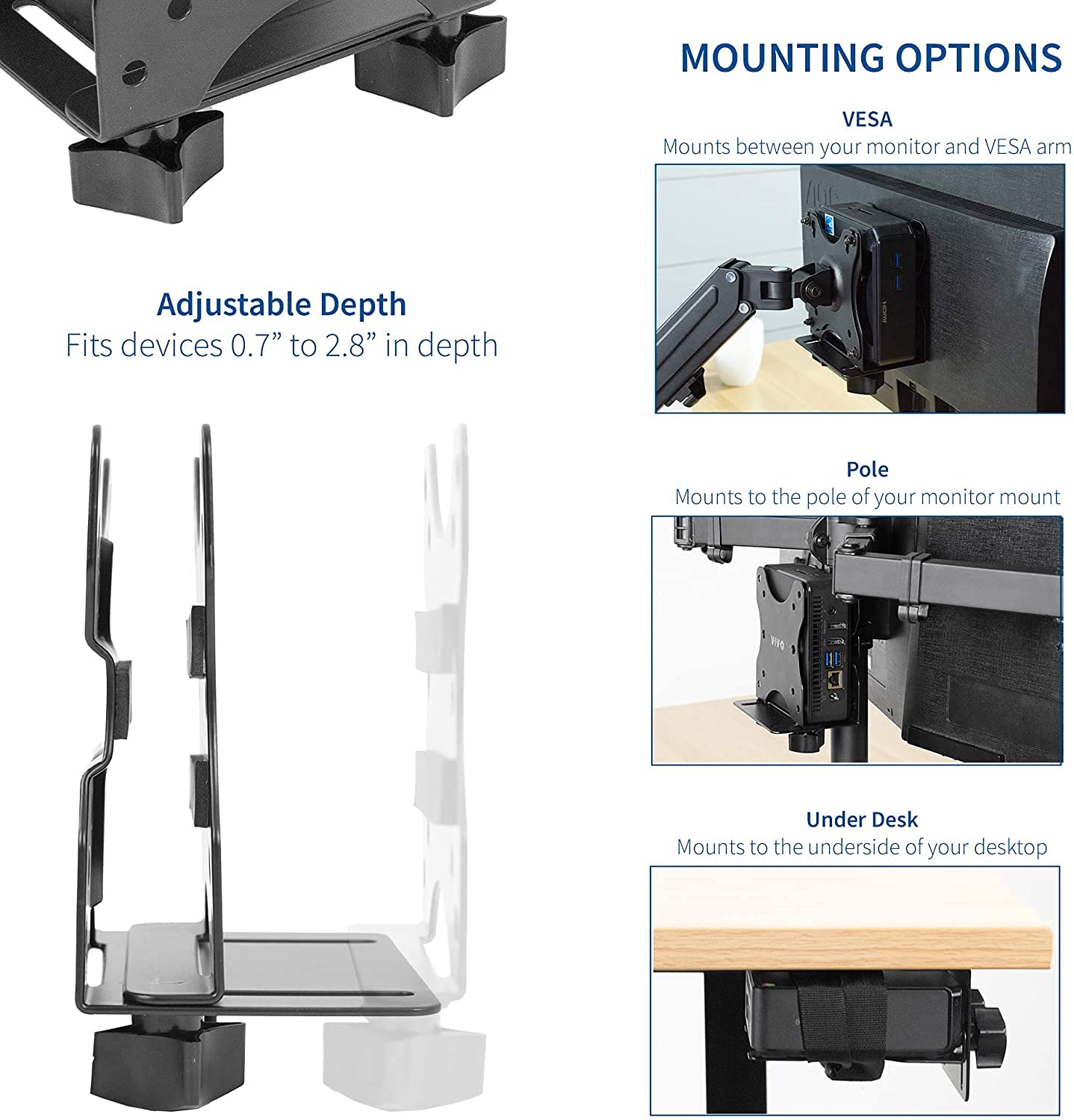
Clear up valuable workspace and protect your equipment with Multifunctional Thin Client PC Mount from Jin Office! Designed to hold small CPU’s, thin clients, docking stations, and more, this versatile mounting bracket features three installation options to best accommodate your workstation. You can either mount your mini PC to the back of your computer monitor, clamp it to your monitor mount pole, or install it under your desk. All of these placement options provide easy access to your thin client in a safe, out-of-the-way location. Designed of solid steel, this bracket is built to last and support up to 6 kgs of weight.
Key Features of the Product

Compatible with Standard VESA holes

Easy Installation

Multiple Installation Option
Jin Office Multifunctional Thin CPU Holder Perfect for Intel NUC, The Mac Mini, Most Small CPUs

Technical Specs Color: Black; Material: Steel Weight capacity: 6 kgs Supports VESA : 50×50, 75×75, 100×100 mm Adjustable Depth: from 0.7″ to 2.8″ inches
Premium Quality CPU Mount
Save desk space with several installation options for mounting your Intel NUC, Thin-Client PC, Small Game Console, Docking Station or USB Hub to the back of your monitor, clamped to a monitor-mount pole, or fixed under your desk. Free up your desk space from unnecessary cable clutter.

Three Installation Methods
Each workstation is different, and this versatile mount was designed to accommodate a variety of layouts. The double-sided VESA bracket mounts your thin client PC to the back of your computer monitor, clamps onto your monitor mount pole, or installs under your desk for safe placement. Adjustable bracket width is provided with simple hand tightening.
Three Installation Methods
Each workstation is different, and this versatile mount was designed to accommodate a variety of layouts. The double-sided VESA bracket mounts your thin client PC to the back of your computer monitor, clamps onto your monitor mount pole, or installs under your desk for safe placement. Adjustable bracket width is provided with simple hand tightening.

Three Installation Methods
Each workstation is different, and this versatile mount was designed to accommodate a variety of layouts. The double-sided VESA bracket mounts your thin client PC to the back of your computer monitor, clamps onto your monitor mount pole, or installs under your desk for safe placement. Adjustable bracket width is provided with simple hand tightening.

Technical Specs
Fits: Devices 0.7” to 2.8” in depthMounting Options: VESA Mount, Pole Mount, Under Desk MountPole Diameter: Must be 1.2” to 1.6”, Minimum Desk Thickness: 5/8”VESA Standard: 75x75mm and 100x100mmWeight Capacity: 6 kgs
On the monitor arm
Under the desk
Behind Monitor
Technical Specs

MULTI-INSTALLATION THIN CLIENT MOUNT: Save desk space with several installation options for mounting your Intel NUC, Thin-Client PC, Small Game Console, Docking Station or USB Hub to the back of your monitor, clamped to a monitor-mount pole, or fixed under your desk. Free up your desk space from unnecessary cable clutter.
ADJUSTABLE FOR MOST SMALL PC AND SOME GAME CONSOLE: Adjustable bracket width up to 2.8” fits computers and Mini PC like Intel NUC (for models with power buttons on the side), Chromebox, Mac Mini, Apple TV, Thin-Client PC, USB Hub, Thunderbolt Docking Station, PS4, Xbox One S
DURABLE STEEL DESIGN: Solid Steel construction plates provides extreme durability to mount both a monitor and Thin-Client PC up to 6Kg on a VESA monitor arm or monitor stand. Supports VESA 50×50, 75×75, 100×100 patterns.
EXTRA PROTECTION: Strong Securing Strap is provided to keep your device from moving and holds the steel plates securely together. Three Anti-scratch Pads are provided to keep your device pristine from any scratch or damage
OPEN FRAME COOLING: The open frame design provides better ventilation by allowing fresh air to pass through your device to reduce thermal throttling while providing unrestricted access to your ports.
Customers say
Customers find the mount bracket well-built and worth its price. They appreciate the assembly instructions, with one customer noting the helpful straps and screws, and another mentioning the nyloc nuts. The fit receives mixed feedback from customers.


